

Hypercore
Reference information about the TimescaleDB hybrid row-columnar storage engine
Hypercore is a hybrid row-columnar storage engine in TimescaleDB. It is designed specifically for real-time analytics and powered by time-series data. The advantage of hypercore is its ability to seamlessly switch between row-oriented and column-oriented storage, delivering the best of both worlds:
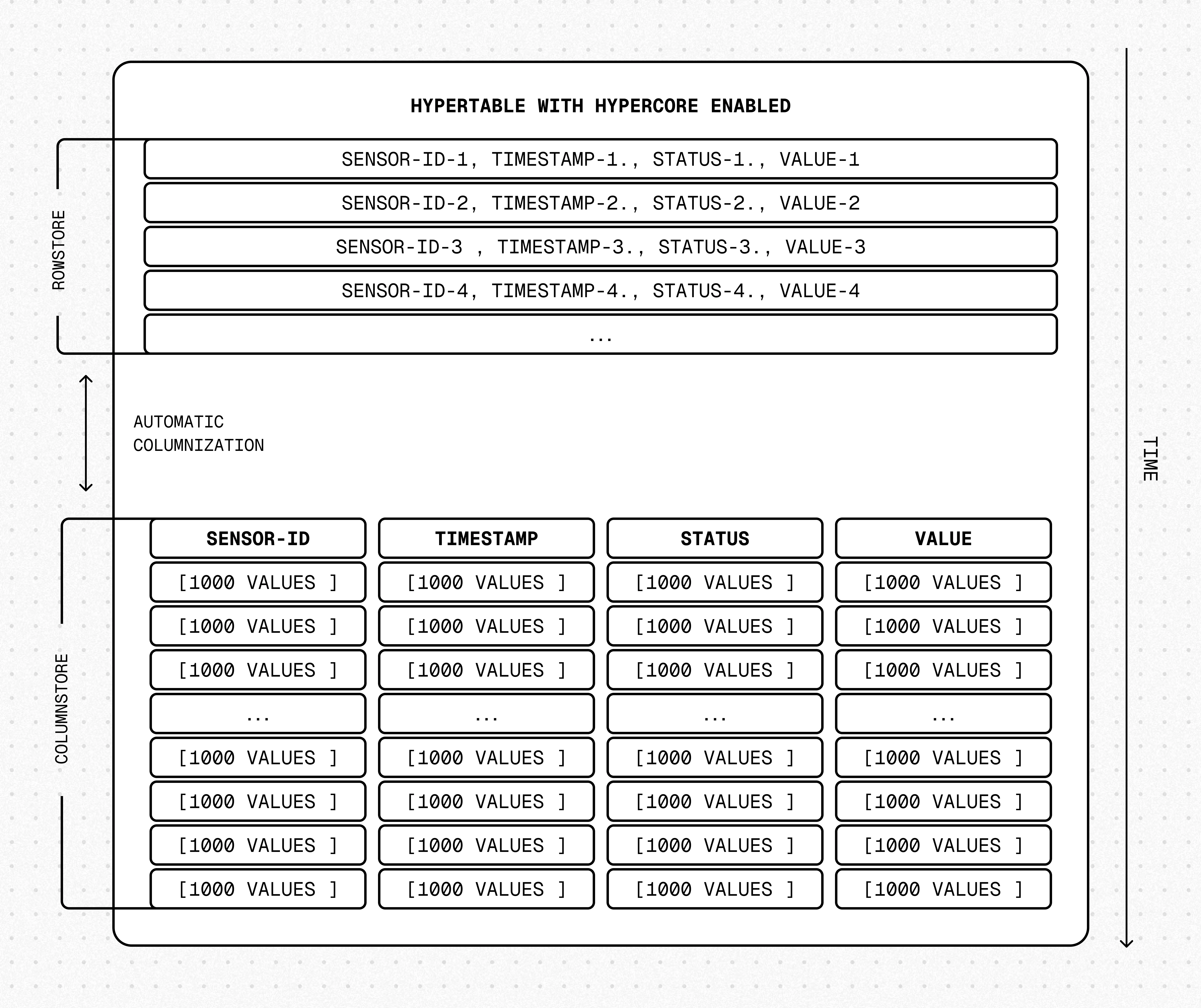
Hypercore solves the key challenges in real-time analytics:
- High ingest throughput
- Low-latency ingestion
- Fast query performance
- Efficient handling of data updates and late-arriving data
- Streamlined data management
Hypercore‘s hybrid approach combines the benefits of row-oriented and column-oriented formats:
-
Fast ingest with rowstore: new data is initially written to the rowstore, which is optimized for high-speed inserts and updates. Real-time applications can handle rapid streams of incoming data, including upserts and late-arriving rows.
-
Efficient analytics with columnstore: as the data cools, TimescaleDB automatically converts it to the columnstore. The columnar format enables fast scanning and aggregation. Multiple mechanisms keep queries fast:
- Chunk skipping skips entire chunks that cannot match the query.
- Vectorized execution evaluates aggregate functions directly on columnstore batches. Since 2.27.0, this path also covers queries whose
WHEREclause uses non-vectorizable functions liketime_bucket(), including continuous aggregate refreshes — yielding 30%–2× faster execution in many cases. - Sparse indexes —
bloomfor equality andminmaxfor ranges — let the engine skip individual batches without decompressing them. Bloom indexes accelerateSELECT,UPDATE,DELETE, andUPSERToperations on compressed data. - Summary queries like
COUNT,MIN,MAX,FIRST, andLASTread results straight from batch metadata.
-
Lower storage costs: 90–98% compression in the columnstore reduces storage cost dramatically, without sacrificing query performance.
-
Fast modification of compressed data in columnstore: just use SQL. TimescaleDB supports
INSERT,UPDATE,DELETE, andUPSERTdirectly on the columnstore, with high-performance paths for each. -
Full mutability with transactional semantics: regardless of where data is stored, hypercore provides full ACID support. Like in a vanilla PostgreSQL database, inserts and updates to the rowstore and columnstore are always consistent and visible to queries as soon as they complete.
For an in-depth explanation of how hypertables and hypercore work, see the Data model.
Samples
Section titled “Samples”Best practice for using hypercore is to:
-
Enable columnstore on a hypertable
For efficient queries, remember to
segmentbythe column you will use most often to filter your data. For example:-
Hypertables:
Use
CREATE TABLE:CREATE TABLE crypto_ticks ("time" TIMESTAMPTZ,symbol TEXT,price DOUBLE PRECISION,day_volume NUMERIC) WITH (timescaledb.hypertable,timescaledb.segmentby='symbol',timescaledb.orderby='time DESC');For TimescaleDB v2.23.0 and higher, the table is automatically partitioned on the first column in the table with a timestamp data type. If multiple columns are suitable candidates as a partitioning column, TimescaleDB throws an error and asks for an explicit definition. For earlier versions, set
partition_columnto a time column.If you are self-hosting TimescaleDB v2.20.0 to v2.22.1, to convert your data to the columnstore after a specific time interval, you have to call add_columnstore_policy after you call CREATE TABLE
If you are self-hosting TimescaleDB v2.19.3 and below, create a PostgreSQL relational table, then convert it using create_hypertable. You then enable hypercore with a call to ALTER TABLE.
-
Continuous aggregates:
-
Use
ALTER MATERIALIZED VIEWfor a continuous aggregate:ALTER MATERIALIZED VIEW assets_candlestick_daily set (timescaledb.enable_columnstore = true,timescaledb.segmentby = 'symbol'); -
Create a columnstore_policy that automatically converts chunks in a hypertable to the columnstore at a specific time interval. For example:
CALL add_columnstore_policy('assets_candlestick_daily', after => INTERVAL '1d');
TimescaleDB is optimized for fast updates on compressed data in the columnstore. To modify data in the columnstore, use standard SQL.
-
-
View the policies that you set or the policies that already exist
SELECT * FROM timescaledb_information.jobsWHERE proc_name='policy_compression';
You can also convert_to_columnstore and convert_to_rowstore manually for more fine-grained control over your data.
Limitations
Section titled “Limitations”chunks in the columnstore have the following limitations:
ROW LEVEL SECURITYis not supported on chunks in the columnstore.
Available functions
Section titled “Available functions”Policies
Section titled “Policies”add_columnstore_policy(): set a policy to automatically move chunks in a hypertable to the columnstore when they reach a given ageremove_columnstore_policy(): remove a columnstore policy from a hypertable
Configuration
Section titled “Configuration”ALTER TABLE (hypercore): enable the columnstore for a hypertable
Manual conversion
Section titled “Manual conversion”convert_to_columnstore(): manually add a chunk to the columnstoreconvert_to_rowstore(): move a chunk from the columnstore to the rowstore
Statistics and information
Section titled “Statistics and information”chunk_columnstore_stats(): get statistics about chunks in the columnstorehypertable_columnstore_stats(): get columnstore statistics related to the
timescaledb_information.chunk_columnstore_settings: get information about settings on each chunk in the columnstoretimescaledb_information.hypertable_columnstore_settings: get information about columnstore settings for all hypertables